If you’re looking for a serious upgrade to your business network – or you’re building a robust home lab and want something properly professional – the UniFi Dream Machine Pro (UDM Pro) is one of the most compelling all-in-one options available today.
Designed by Ubiquiti Inc. the Ubiquiti UDM Pro combines a security gateway, managed switch, network controller, and video recorder into a single 1U rack-mounted unit. That means fewer boxes, fewer cables, and a much tidier comms cabinet. It’s aimed at small to medium-sized businesses, IT consultants, managed service providers, and technically confident home users who want enterprise-level control without enterprise-level pricing.
In this detailed review, we’ll walk through what it does well, where it may not suit everyone, and why it has become such a popular choice across offices, schools, retail units, and even high-end residential setups.
First Impressions & Build Quality
Straight out of the box, the UniFi UDM Pro looks and feels like proper professional kit. It’s a standard 1U rackmount unit, so it fits neatly into a server rack or wall-mounted data cabinet commonly used in offices and structured home installations.
The front panel is clean and minimal, with a small integrated touchscreen display that shows:
- WAN status
- IP information
- Throughput
- System health
- Alerts
It’s a small detail, but in real-world environments it’s genuinely useful. If your broadband drops or there’s an issue on site, you can quickly glance at the screen without logging in.
- 8 x Gigabit Ethernet LAN ports
- 1 x 10G SFP+ WAN port
- 1 x 10G SFP+ LAN port
- 1 x RJ45 WAN port
- HDD bay for UniFi Protect (3.5” drive)
The layout is tidy and clearly labelled. It feels solid, well engineered, and built to sit quietly in a comms cabinet doing its job 24/7.
What Exactly Is the UDM Pro?
At its core, the UDM Pro is four things rolled into one:
- A high-performance security gateway/router
- An 8-port managed switch
- A UniFi Network Controller
- A network video recorder (NVR) for UniFi Protect
Instead of buying separate appliances for routing, firewall, switching, and camera recording, the UDM Pro consolidates them into a single device. For many UK SMEs, that means lower hardware costs, easier installation, and less ongoing maintenance.
It’s particularly attractive for businesses already using the UniFi ecosystem – access points, switches, and cameras all integrate seamlessly.
Performance: Built for Modern Connectivity
With full fibre (FTTP) rolling out rapidly across the UK, more businesses now have access to gigabit broadband. The UDM Pro is more than capable of handling that.
Thanks to its 10G SFP+ WAN support, it’s future-proofed for high-speed connections. Even if you’re currently on a 300Mbps or 500Mbps FTTP package, the hardware is ready for faster services down the line.
When it comes to security features like IDS/IPS (Intrusion Detection and Prevention), performance remains strong. Many lower-cost routers struggle when advanced security is enabled, but the Unifi UDM Pro maintains solid throughput even with threat management turned on.
For typical use cases such as:
- 20–80 staff in an office
- Multiple VoIP handsets
- Cloud applications (Microsoft 365, Google Workspace)
- Guest Wi-Fi networks
- CCTV recording
it handles everything comfortably.
The UniFi Management Experience
One of the UDM Pro’s biggest selling points is its centralised management interface.
Instead of juggling multiple admin panels, everything is controlled through a single dashboard. From one login you can manage:
- Wi-Fi access points
- Switches
- VLANs
- Firewall rules
- VPN access
- Cameras
- User permissions
- Traffic monitoring
The interface is modern, clean, and logical. If you’re an IT professional or MSP managing multiple sites, this unified view is a major time saver.
For businesses with multiple branches say, a chain of retail shops or small offices in different towns remote management is particularly valuable. You can deploy, monitor, and troubleshoot without travelling to site.
Security Features That Actually Matter
Cybersecurity isn’t just a concern for large enterprises. UK SMEs are increasingly targeted by phishing, ransomware, and brute-force attacks. The UDM Pro includes several features designed to protect against these risks:
- Stateful firewall
- Deep Packet Inspection (DPI)
- Intrusion Detection and Prevention (IDS/IPS)
- GeoIP filtering
- VLAN segmentation
- VPN server support
The ability to segment your network is especially useful. For example:
- Separate staff and guest Wi-Fi
- Isolate CCTV cameras
- Create a dedicated VoIP VLAN
- Restrict access to sensitive servers
This is enterprise-grade functionality without enterprise complexity.
UniFi Protect & CCTV Integration
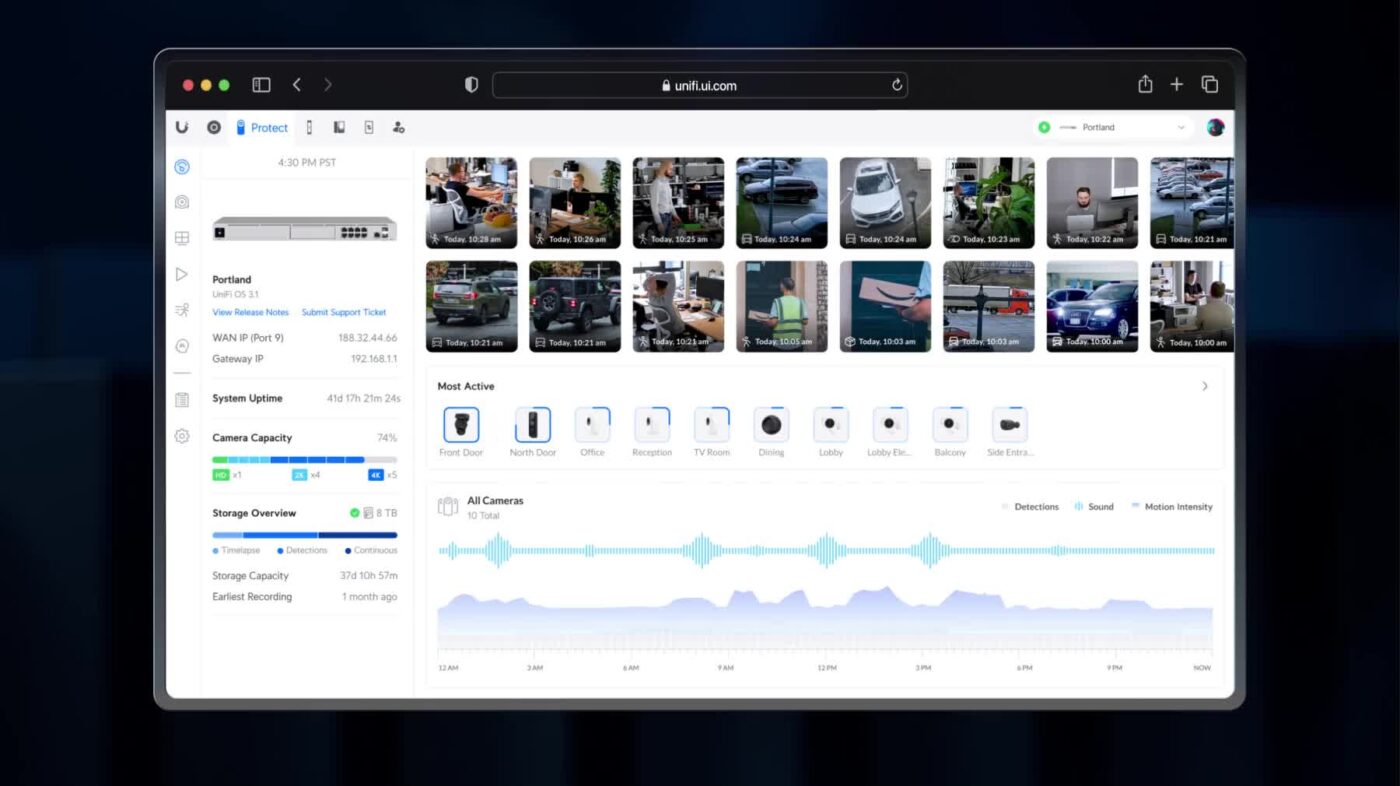
If you’re running security cameras, the UDM Pro can also act as your NVR using UniFi Protect. Simply install a compatible hard drive and connect UniFi cameras.
For UK businesses such as:
- Retail shops
- Warehouses
- Offices
- Clinics
- Hospitality venues
this consolidation can significantly reduce costs compared to buying a separate NVR.
The Protect interface is intuitive, with:
- Timeline scrubbing
- Motion alerts
- Remote access
- User permission controls
For smaller installations (a handful of cameras), the UDM Pro handles recording perfectly well. Larger deployments may require a dedicated UniFi NVR, but for most SMEs, it’s more than sufficient.
Installation & Setup
Installation is straightforward for anyone with networking experience.
Typical setup steps include:
- Mounting in a rack
- Connecting WAN to your modem or ONT
- Connecting LAN devices or switches
- Running the initial setup wizard
The guided setup process is clear and structured. That said, this is not a “plug it in and forget it” home router. To get the most out of it, you’ll need a working understanding of:
- IP addressing
- VLAN configuration
- Firewall rules
- DHCP
- VPN configuration
For businesses without in-house IT, professional installation is often worthwhile.
Everyday Use in a Business Environment
In daily operation, the UDM Pro is:
- Stable
- Quiet
- Low maintenance
- Reliable
Firmware updates are released regularly, improving security and adding features. The system alerts you to updates directly within the dashboard.
For hybrid working environments the built-in VPN functionality allows staff to securely connect to the office network from home.
Things to Be Aware Of
No product is perfect. Here are a few considerations before purchasing:
1. No PoE on Built-In Ports
The 8 LAN ports are not PoE. If you’re powering UniFi access points or cameras, you’ll need a separate PoE switch or injectors.
2. Learning Curve
If you’re used to basic ISP routers, this is a significant step up in complexity.
Who Is It Best Suited For?
The UDM Pro is ideal for:
- Small to medium-sized businesses
- IT consultants and MSPs
- Multi-site retailers
- Professional home lab users
- Offices migrating to full fibre
It’s likely overkill for a small home or business with basic broadband, but for structured networks, it’s a superb option.
Value for Money
Compared to traditional enterprise firewall brands, the UDM Pro offers exceptional value. You’re getting routing, firewall, switching, controller software, and NVR functionality in one device at a price point accessible to SMEs.
For many businesses, that consolidation alone justifies the investment.
Final Verdict
The UniFi Dream Machine Pro (UDM Pro) strikes an impressive balance between enterprise capability and SME affordability. It’s powerful, scalable, and neatly integrates networking and surveillance into one cohesive system.
For businesses looking to future-proof their infrastructure, improve security, and simplify network management, it’s an outstanding choice.
It’s not aimed at casual home users. But for those who want professional-grade networking without enterprise-level licensing costs, the UDM Pro remains one of the strongest all-in-one solutions available today.
